
Modern web projects move fast. If you’re a UK business working with a website design agency, you want visibility, fewer surprises, and a smoother path from first conversation to launch. Figma helps deliver exactly that. By centralising planning, wireframes, prototypes, and developer handoff in one cloud workspace, it gives clients and agencies a shared, always‑current view of the website as it takes shape.
This guide explains how using Figma transforms the client–agency workflow from brief through wireframes and high‑fidelity prototypes to handoff and launch. You’ll see how this approach accelerates feedback, improves collaboration, reduces risk, and sets you up for future growth.
At a glance: the Figma website workflow in 5 steps
Copy shareable section link- Brief & discovery: align goals, audiences, and success metrics in a shared Figma file.
- Wireframes: low‑fidelity screens for structure and layout, with real‑time comments.
- High‑fidelity prototypes: clickable journeys that feel like the finished site.
- Design system & components: reusable styles and UI blocks that keep everything consistent.
- Developer handoff & launch: inspect measurements, export assets, and release with confidence.
Why many agencies now adopt Figma
Copy shareable section linkFigma has become the design platform of choice for a growing number of web design companies because it solves real workflow problems for clients and teams:
- Real‑time collaboration: everyone can view, comment, and co‑edit in the browser without installing software.
- Cloud‑based access: your project is available anywhere, which suits hybrid teams and busy stakeholders.
- Version history: track changes and roll back if needed, reducing risk while exploring ideas.
- Interactive prototypes: click through journeys before development starts, so issues surface early.
- Design system support: components, libraries, and tokens help maintain visual and UX consistency.
- Developer handoff: built‑in inspection shows spacing, typography, and code snippets for CSS, iOS, and Android, which reduces misinterpretation.
For an overview of how designers use Figma for sites, see the Figma web design overview. If performance is on your mind, remember that design decisions influence speed and UX. Google’s guidance on Core Web Vitals is a helpful reference when agreeing design standards with your agency.
From brief to live: the stage‑by‑stage breakdown
Copy shareable section link1) Brief & discovery: setting up the project in Figma
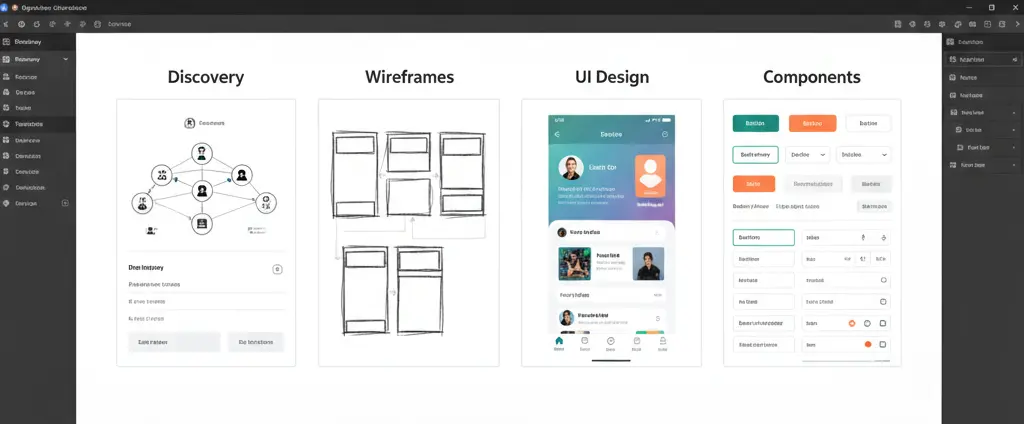
Good sites start with clear goals. In discovery, your agency captures business objectives, audiences, content priorities, and success metrics. In a Figma project, we create pages or sections for the brief, personas, sitemap drafts, and early visual references. Using FigJam boards within the same workspace keeps workshops, notes, and research artefacts in one place for easy reference.
Two quick wins at this stage:
- Moodboards and early direction: curated examples of typography, colour, imagery, and interaction patterns, so stakeholders react to real visuals rather than abstract terms.
- Foundations and constraints: initial design tokens such as brand colours, spacing, and grid rules. Locking these early reduces rework later.
2) Wireframes & low‑fidelity design: structure first
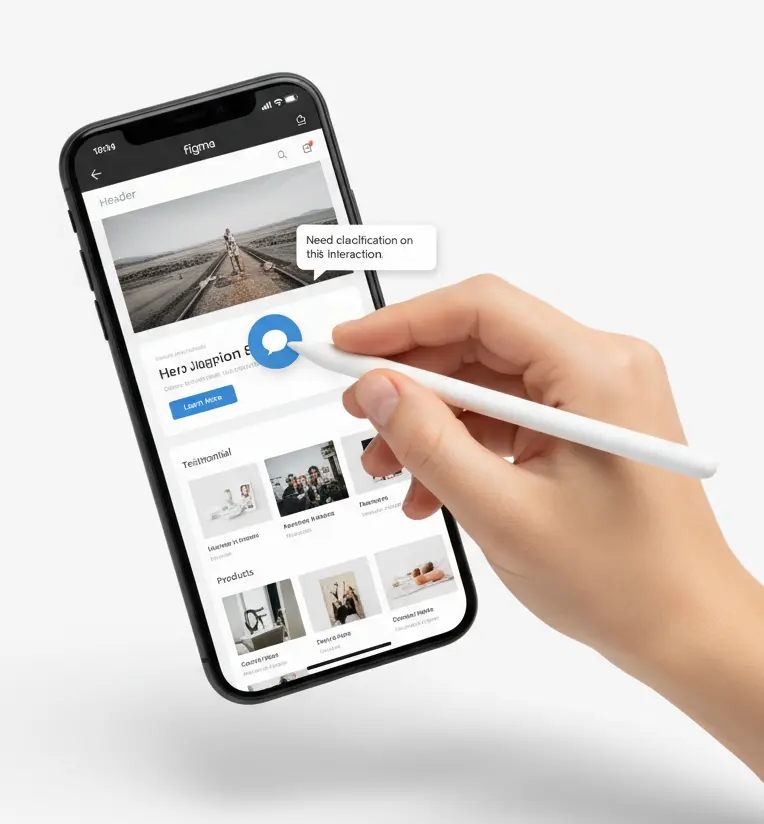
Wireframes are simplified layouts that focus on structure and content hierarchy, not polish. In Figma, clients can open the file in a browser, view the flow, and comment on specific elements. Because comments are pinned to the canvas and threaded, discussions stay connected to the exact part of the page you’re reviewing.
Typical activities in this phase:
- Agreeing content blocks for key templates such as the homepage, service pages, product pages, and articles.
- Testing page depth and navigation labels against your information architecture.
- Checking that priority tasks are visible and simple, for example booking a demo or checking out.
Expect the wireframe round to be quick and iterative. Because everything is in the cloud, your website designer and stakeholders can refine layouts in hours rather than days of back‑and‑forth PDFs.
3) High‑fidelity design & interactive prototypes
Once structure is agreed, the team layers in brand elements, imagery, and micro‑interactions. Figma’s prototyping links let you click through journeys with realistic transitions, fixed headers, and component variants. You can experience the site before any code is written, which is invaluable for early validation of navigation, copy length, and mobile behaviours.
Useful activities here:
- Clickable user stories: for example, “as a new visitor I compare pricing tiers”, “as a trade customer I reorder from my account”, or “as a buyer I filter products and check out”.
- Accessibility checks: confirm colour contrast, tap targets, and focus states. Small adjustments here prevent costly fixes post‑build.
- Performance‑aware design: specify image aspect ratios, typography systems, and component rules that support fast load times.
4) Design system & component library: consistency by default
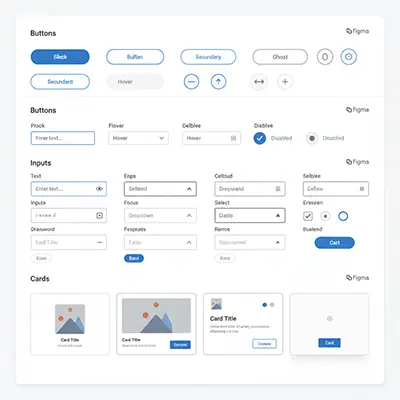
Figma shines when an agency builds a shared library of components and styles: buttons, form fields, cards, banners, menus, and icons, each with variants for states such as hover, focus, and disabled. This system is the source of truth for visual decisions, which gives you a future‑proof foundation for new pages, campaigns, and products.
Why this matters:
- Consistency: users learn your interface once. That makes your site easier to use and reduces support queries.
- Speed: your agency and web developer compose new pages quickly from tested parts rather than reinventing UI from scratch.
- Scalability: design tokens for colour, typography, spacing, and shadows can be mapped to your codebase, so changes cascade predictably.
5) Developer handoff & launch: fewer gaps, faster delivery
When design is approved, Figma’s handoff features reduce ambiguity. Developers inspect layers to see spacing, sizes, and styles, and they can copy code snippets and export the right assets in SVG, PNG, or WebP. Because the prototype documents states and interactions, fewer assumptions are made during build.
To keep launch smooth, align your design handoff with a practical QA plan:
- Template‑by‑template checks: validate each page type against the prototype and design system.
- Responsive behaviours: review key breakpoints on actual devices and browsers, not just the canvas.
- Performance & SEO hygiene: optimise media, verify meta data, and test schema. Resources such as the Semrush website launch checklist are handy for final checks.
Client benefits: what you gain from a Figma‑first project
Copy shareable section link- More transparency: see live designs evolve rather than waiting for one‑off presentations. Comments and decisions are captured in context.
- Faster revisions: collaborate in real time, which shortens approval cycles and time to market.
- Reduced risk: clickable prototypes mean fewer surprises at go‑live, and a design system reduces inconsistencies.
- Future flexibility: the component library is reusable, so adding pages, landing campaigns, or new features is quicker and more consistent.
- Better UX and SEO alignment: tightening information architecture, navigation, and performance pays off in engagement and search. For a practical perspective, see Ahrefs’ view on bringing UX and SEO together.
Agency benefits and why that matters to you
Copy shareable section linkFor agencies, Figma reduces rework, standardises delivery, and boosts cross‑team throughput. That directly benefits clients: quicker cycles, lower delivery risk, and better quality at the same budget. Whether you’re engaging a creative agency for brand‑led work or a web development agency for complex builds, Figma provides the shared language that keeps everyone in sync.
Tips for clients
Copy shareable section linkPractical tips for clients: how to get the most from Figma
How to comment productively
- Be specific: click the pin tool, select the element, and write one point per comment. Tag people with @names if you need a response.
- Prioritise: label feedback as “must‑have”, “nice‑to‑have”, or “question” to focus the next iteration.
- Consolidate by page: gather stakeholder input, agree internally, then submit one clear set of comments per screen or template.
What feedback to give at each stage
- Wireframes: talk about hierarchy, flow, and content. Avoid colours and typography at this stage.
- High‑fidelity: confirm brand fit, imagery, and micro‑interactions. Check real copy length and real data where possible.
- Prototype: complete end‑to‑end tasks on mobile and desktop. Note where you hesitate or can’t find something.
Staying aligned through delivery
- Weekly reviews: short walkthroughs in the Figma file keep momentum and reduce misinterpretation.
- Content readiness: final copy and assets accelerate development. Your agency can help with content design if needed.
- Performance mindset: agree thresholds for image sizes, font loading, and interaction timing to support Core Web Vitals.
How Doublespark implements this Figma‑first approach
Copy shareable section linkAs a UK website design agency and SEO specialist, Doublespark uses Figma on every site build, from brochure sites to complex ecommerce. Our process is designed to give business owners and marketing managers clarity throughout.
- Kick‑off and goals: we align objectives, audiences, and KPIs, then set up a shared Figma space with FigJam for discovery.
- Sitemap and wireframes: rapid low‑fidelity templates validate structure and content priorities.
- High‑fidelity prototypes: branded screens with interactive flows for all critical user journeys.
- Design system: reusable components and tokens mapped to your build stack for reliable scaling.
- Developer handoff: our web developers use Figma Inspect and component specs to build pixel‑accurate templates.
- QA and launch: template checks across devices and browsers, performance optimisations, and content verification before go‑live.
- Post‑launch optimisation: continuous improvements to UX and search based on analytics, ensuring design and SEO work together.
If you’re planning a redesign or a new build, explore our website design services, or speak to us about aligning UX with search from day one through our SEO services. When you’re ready to talk specifics, contact our team and we’ll share a sample Figma workspace tailored to your brief.
Real‑world use cases: from simple sites to ecommerce
Copy shareable section linkWhether you need a brochure site or full ecommerce website design, the same Figma principles apply. We prototype category views, product detail pages, filters, and checkouts so you can test journeys before development. If you’re considering Shopify, a Shopify website builder approach informed by a design system speeds up rollout while keeping brand quality high. For custom needs, our web development team adapts components to your stack and performance targets.
This consistency matters even if you searched for a “website designer near me” to work locally. What you really need is a predictable process and a team that designs with build and growth in mind. Figma keeps everyone honest about what’s agreed, what’s in scope, and what’s left to decide.
FAQs
Copy shareable section linkDo I need a paid Figma account to review my project?
No. Clients can review, comment, and test prototypes in a browser without buying a licence. Your agency will handle editor permissions.
How is feedback handled so it doesn’t get lost?
Comments are pinned to the canvas and threaded. We use labels for priority and resolve items as they’re addressed, so the file becomes a living audit trail.
How does Figma reduce risk at launch?
Interactive prototypes help you experience the journey before code. The design system enforces consistency, and the developer handoff features reduce interpretation errors. A practical pre‑launch checklist, like the one from Semrush, closes the loop.
Will this help SEO?
Yes. Clear information architecture, accessible components, and performance‑aware design support engagement and search. For a practical overview, see Ahrefs on UX and SEO and Google’s guidance on Core Web Vitals.
What if my site needs custom integrations?
Figma is platform‑agnostic. We document integrations and states in the prototype, then our web development company team implements and tests them in staging before launch.
Client checklist: how to keep the project on track
Copy shareable section link- Agree the brief, target audiences, and success metrics.
- Nominate a single internal approver to consolidate stakeholder feedback.
- Provide brand assets, copy drafts, and examples you like early in the process.
- Use Figma comments for specific, actionable feedback and label priorities.
- Test prototypes on your own devices and note anything confusing or slow.
- Prepare final content and media before development starts to minimise delays.
- Join short weekly reviews to keep momentum until launch.
Conclusion: better visibility, fewer surprises, faster launch
Copy shareable section linkFigma brings clarity to the parts of a website project that often cause friction. Instead of static PDFs and scattered emails, everyone works in a shared space with live designs, pinned comments, and clickable journeys. That transparency leads to faster decisions, a stronger build, and a smoother launch.
If you’re choosing a partner for website development or looking for a web design company that blends UX and SEO from the outset, Doublespark can help. Explore our website development services, see how we integrate design and search, and get in touch to discuss your brief.